Workflow platform · Own platform · internal use
Every project starts with a process of the client: a call to answer, an email to reply to, an invoice to enter in the accounting software. We build that process as a workflow and run it on our own internal platform. An event starts the workflow, a series of steps does the work, and the platform measures each step. The client does not have to change tools. We adapt to their needs and their software. The result can be a phone agent, an integration between their systems, a robot that works out of sight or an MCP for their own AI assistant.
· 5 min read
- Industry
- AI agents · workflows, integrations and monitoring
- Location
- Internal use · the base of our projects
- Scope
- Visual workflow editorInbound, outbound and web calls, email, webhook and scheduleVoice and email agentsHTTP, AI classification, Gmail and Outlook stepsBranches, parallel paths, waits and loopsConnection to the client's softwareDelivery as an agent, integration, robot or MCPTemplates and import from ElevenLabs, Retell and VapiTwilio and Telnyx numbers, or the client's SIP trunkCost per call and margin per clientLatency per turnNumber and route healthScheduled test calls and regression testsRules before every outbound call
- Benefits
- The client keeps their software. The workflow adapts to it, not the other way around
- A new process does not start from zero: we reuse the steps that already work in other projects
- We change the workflow on the canvas and test it before we publish it. The published version stays the same until we publish another one
- Every call shows its cost in parts: speech-to-text, model, text-to-speech and phone line, with the carrier's rounding
- A slow turn shows the step that lost the time. A number that no longer receives calls appears before a caller finds the problem
- A failed call becomes a test. Before we publish a change, we see whether it broke calls that worked before
Ways to start a workflow: inbound, outbound or web call, email, webhook and schedule
Ways to deliver it: phone agent, integration, background robot or MCP
New tools the client's team has to learn
Client workflows in production
Context
A voice agent uses four providers on every call: transcription, language model, voice and telephony. Each provider bills in its own unit: audio minutes, tokens, characters or line minutes. The invoice arrives at the end of the month, with the costs of all clients mixed together.
At first we built each agent in code, one per client. Every change needed a developer. When a client said "the agent is slow" or "it doesn't pick up", we had no data to check. So we built two internal tools: one to build agents and one to monitor them. In November 2026 we merged them into one platform.
On the platform, an agent is one step in a workflow. A call is only one of the events that can start a workflow. Cost, latency, phone lines, test calls, regression tests and outbound rules are all in one place, for the same workflows and the same calls.
What the client gets
The platform is ours. The client does not have to learn another tool. The workflow connects to their software (their ERP, CRM, email or booking system) and reaches them in the form that suits them.
- A phone agent
- It answers calls on their number, or makes calls, and records the result in their software.
- An integration
- It connects two systems that did not share data. A message from an email or a form arrives in their ERP or CRM, already checked.
- An invisible robot
- It works in the background, on a schedule or when an event occurs. It has no screen, and nobody has to start it.
- An MCP
- An MCP server lets the client's own AI assistant (Claude, ChatGPT or another) use the workflow as a tool. MCP is the protocol that AI assistants use to call external tools.
Build
- Canvas
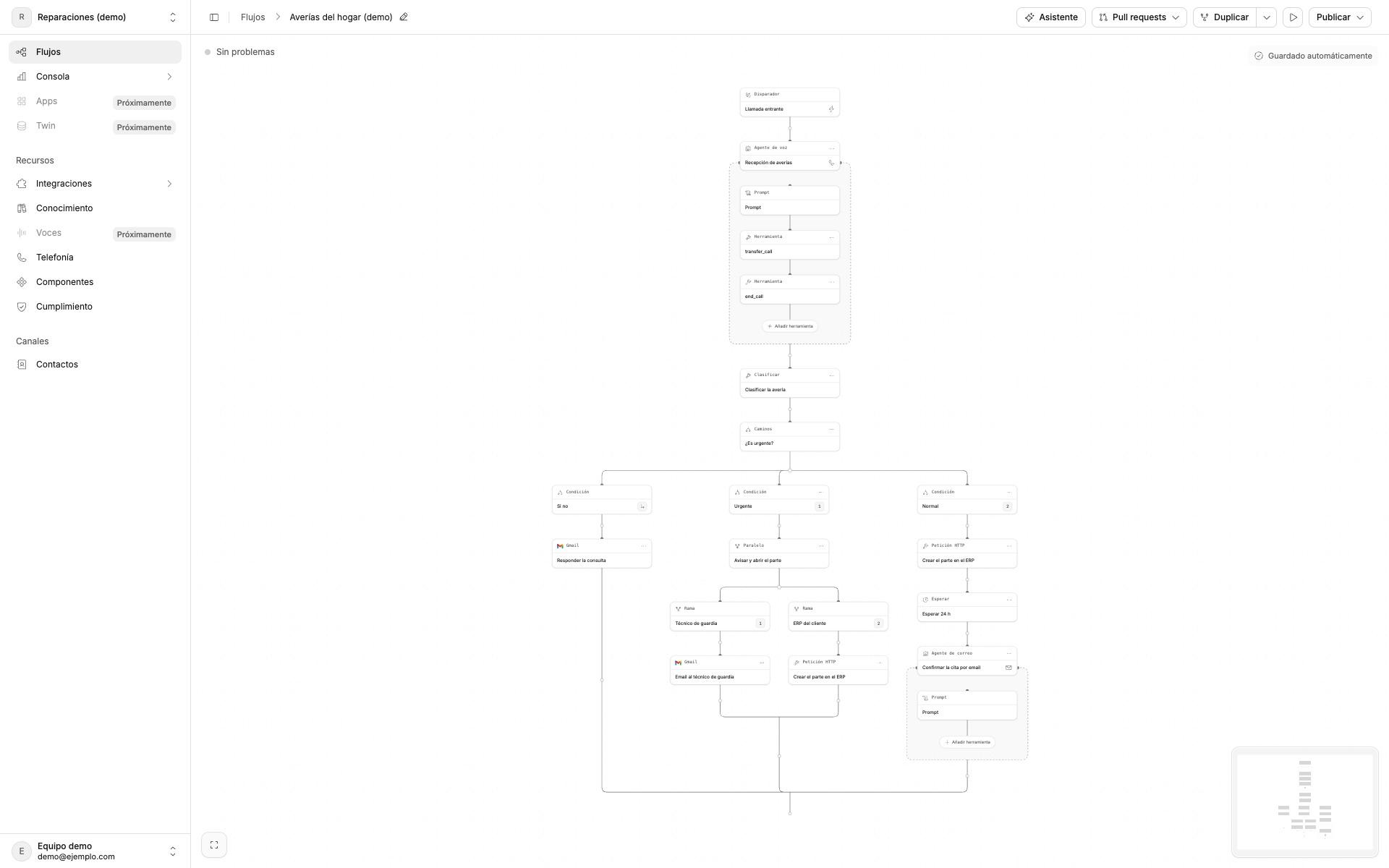
- A workflow starts from a trigger: an inbound, outbound or web call, an email, a webhook or a time of day. Then it runs its steps in order. A step can be an agent, an HTTP request, an AI classification, or an email action in Gmail or Outlook. Branches, parallel paths, waits and loops control the order of the steps.
- Agents
- An agent step talks by voice or by email. We select the transcription, language and voice models. Each option shows its price.
- Where to start
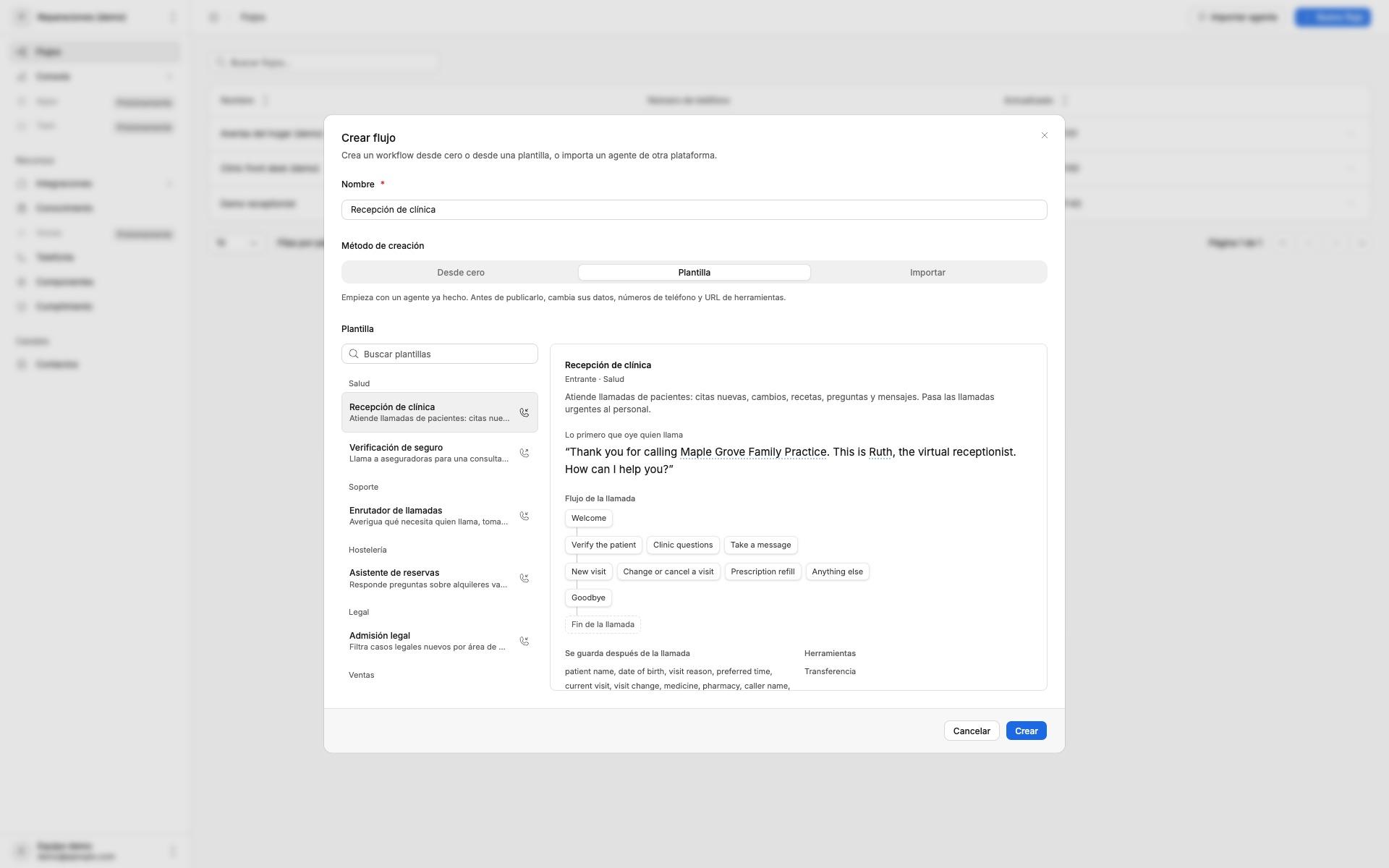
- From an empty trigger, from a template or from an agent that the client already has on ElevenLabs, Retell or Vapi. The templates include a clinic front desk, a call router, bookings, legal intake and lead follow-up.
- From a chat
- The platform has its own MCP server. We can describe a workflow in Claude or ChatGPT, and the platform builds or changes it. We test the draft from a link. A person always approves the publication.
- Testing and versions
- We talk to the draft while we edit it. Each publication creates a version that does not change. To go back, we select the previous version.
- Phone
- We buy Twilio or Telnyx numbers in the platform, or we connect the SIP trunk that the client already has. Spanish numbers need the approved documents of each client. Outbound calls go one at a time or in batches.
- Clients
- Each client has a separate space with its workflows, numbers and calls. The client can see them and, if they want, change them without code.
Monitor
- Cost and margin
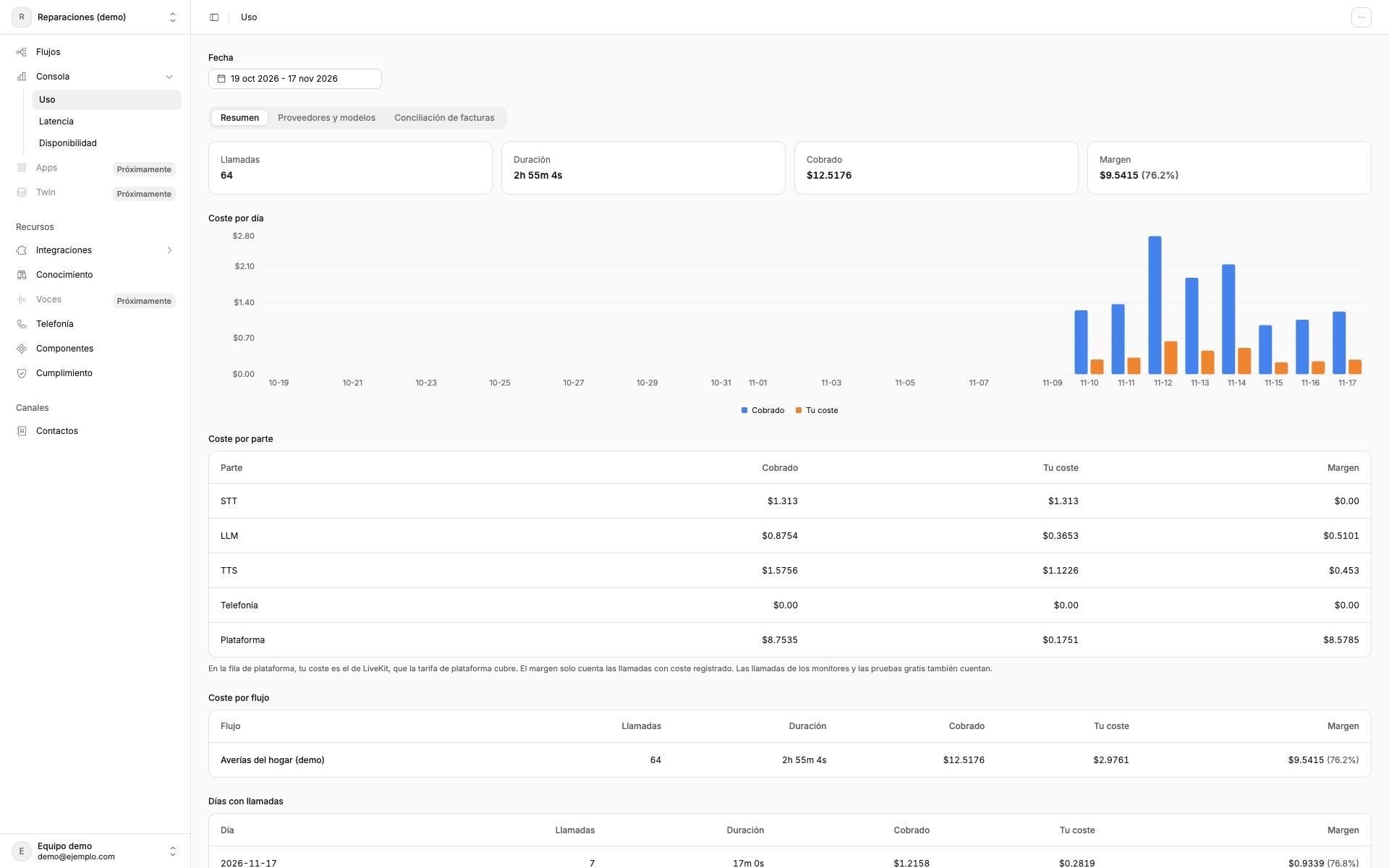
- The platform calculates the usage of each provider on each call, at its rate. It rounds the phone line to the carrier's billing increment. It reconciles invoices and exports them to CSV. An alert starts when the margin of a client decreases.
- Wait
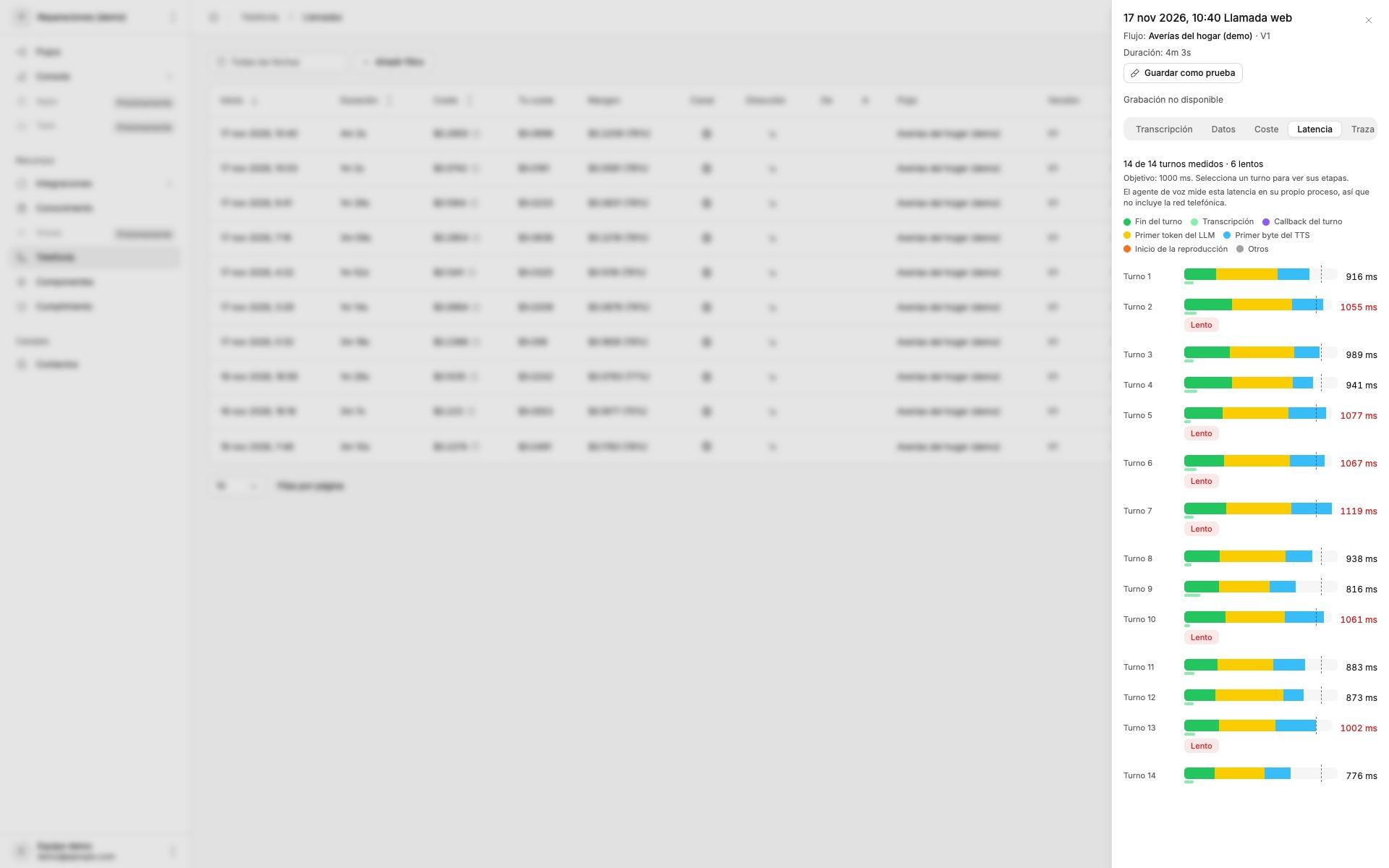
- The platform measures the latency of every turn and splits it by stage. Each call has a waterfall chart. Alerts use the 95th percentile, and each agent has its own target.
- Lines
- Every 5 minutes, the platform checks that each number still reaches its destination through its Twilio trunk or Telnyx connection. It groups SIP failures by code, with the probable cause and the fix. An open alert sends a reminder after 24 hours.
- Test calls
- The platform calls the agent on a schedule, over the web or over the phone network. It marks silence, a cut greeting, both sides talking at the same time and a noisy line.
- Regressions
- We save a failed call as a test, with the answers of its tools. Exact checks run first, for example whether the agent called a tool or said a phrase. Then an AI model votes as a judge. Before a publication, the platform compares the draft with the previous version on results, cost and reply time.
- Outbound calls
- Before each outbound call, the platform checks consent, the do-not-call list, calling hours and holidays. For commercial calls to Spain, it also checks the business name and the Lista Robinson. Each decision goes into a chained audit log.
The hard part
On the phone, half a second of silence is easy to hear. The voice agent runs in its own process, separate from the app. We adjust the turn timings for each agent. The platform shows the stage that takes the time in each turn.
Prices change, and each provider uses its own unit. The platform calculates each call in one place. The cost, the client's charge and the margin come from the same rule. The platform rounds the line the same way as the carrier, so a 20-second call counts as one full minute. If a model has no price, the platform marks it and does not count it as zero.
Each client uses different software. For this reason, the steps are small parts, such as an HTTP request, an email or a classification. We combine them for each case. The client does not have to adopt a closed product.
These are the calls of our clients' customers. Row-level security in the database keeps the data of each client separate. Any person can ask what the platform keeps about their number. The platform then erases that data and keeps the number on the do-not-call list.
Status
We build our projects on this platform, for example the hotel receptionist in these case studies.
Test calls over the phone network are off by default, and they have not made a real call yet. The rules for commercial calls to Spain still need a review by a lawyer.
The number of client workflows in production shows as pending above, because we do not have it yet.
Next step
Do you have a process that an agent could do with the software you already use? Let's talk.